How to Park a Domain in cPanel?

Updated 2 months ago 20085 views
Note: Before parking a domain, First you need to update name server of your domain you want to park to your main domain name server.


1. Log into your cPanel account.
2. In the "Domains" section, click on "Aliases" Icon.
 

3. Under "Create a New Alias" you should enter the domain name you want to park in the text field.
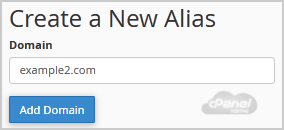


4. Click on the "Add Domain" button.

You should see a success message that your Domain is Parked Successfully.


Still need help?

If this article did not answer your question, our support team can help.

Contact support Browse all articles