How to Check the RAM of the VPS, the IP, the Disk Capacity, and the Virtualization Details?

Updated 2 months ago 19534 views
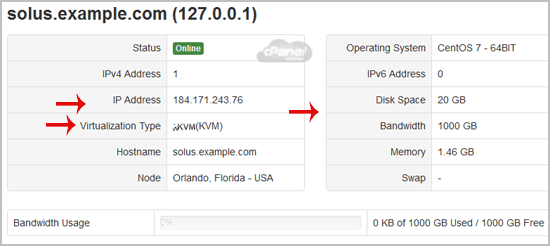
You can check your VPS specification like RAM, disk space, virtualization, IP Address, etc from the SolusVM Control Panel.


1. Login to your SolusVM Control Panel.
2. If you have multiple VPS, select the appropriate one.
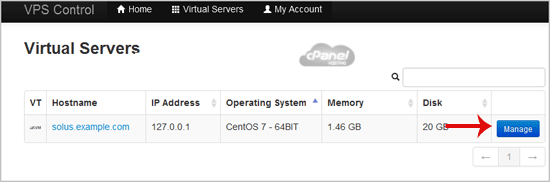


3. Under your VPS hostname, you can see VPS specifications like the IP address of the VPS, the operating system"s disk size, the amount of available RAM, the hostname, the Virtulization details such as KVM, Xen, OpenVZ, etc.

Still need help?

If this article did not answer your question, our support team can help.

Contact support Browse all articles