How to Change the Display Name of a WordPress User Account?

Updated 2 months ago 20685 views
You can change the display name of your WordPress account which show on a WordPress post or comments without changing your wordpress username.


1. Login to your WordPress admin dashboard.

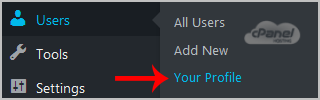
2. Under the dashboard menu, hover your mouse over "Users" and then click on "Your Profile".


3. Locate "Nickname" and enter your new name.



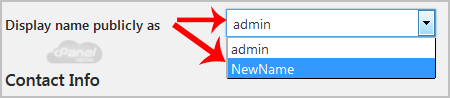
4. In the option "Display name publicly as", choose your newly added nickname from the drop-down menu.

Still need help?

If this article did not answer your question, our support team can help.

Contact support Browse all articles