How to change the password of the FTP Account in cPanel?

Updated 2 months ago 18096 views
If you want to change main root FTP Account then you need to change the password of your cPanel Account. However, if you want to change the password of a specific FTP Account, you should follow this instruction.

1. Log into your cPanel account.
2. In the "Files" section, click on "FTP Accounts" Icon.



3. Under the "FTP Accounts" list, click on "Change Password" or use the "Password Generator".
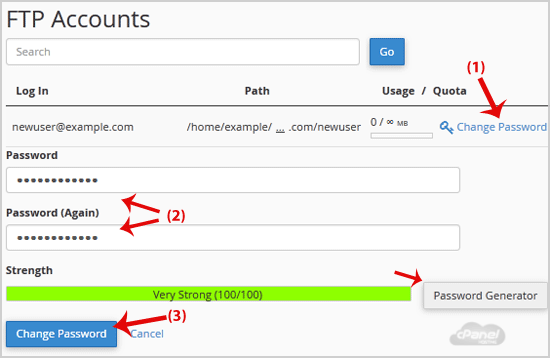

4. Click on the "Change Password" button.


Now you can access your FTP user account with your new password.

Still need help?

If this article did not answer your question, our support team can help.

Contact support Browse all articles