How to enable Apache SpamAssassin in cPanel?

Updated 2 months ago 18977 views
Apache SpamAssassin is a mail filter that identifies spam. It is an intelligent email filter that uses a diverse range of tests to identify unsolicited bulk email, more commonly known as spam. These tests examine email headers and content to classify email with advanced statistical methods.

1. Login to your cPanel Account,
2. In the "Email" section, click on "Apache SpamAssassin" Icon.

 

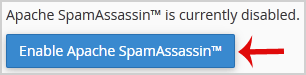
3. Click on the "Enable Apache SpamAssassin" button.


Now, when you receive a spam message with spam score of 5 or more, the spam email will be automatically removed by Spam Assassin.

Still need help?

If this article did not answer your question, our support team can help.

Contact support Browse all articles